FREE IPHONE APP · BY EQUILIBRIUM MARKETING

Business Brain

A day planner for business owners that keeps today’s list short and helps you start the task you keep avoiding.

THE SHORT VERSION

What is Business Brain?

Business Brain is a free iPhone app for people who run a business and wear every hat in it: marketing, operations, the books, tech support, and the actual work. You put in your tasks and your notes. It hands you back one short list called Today.

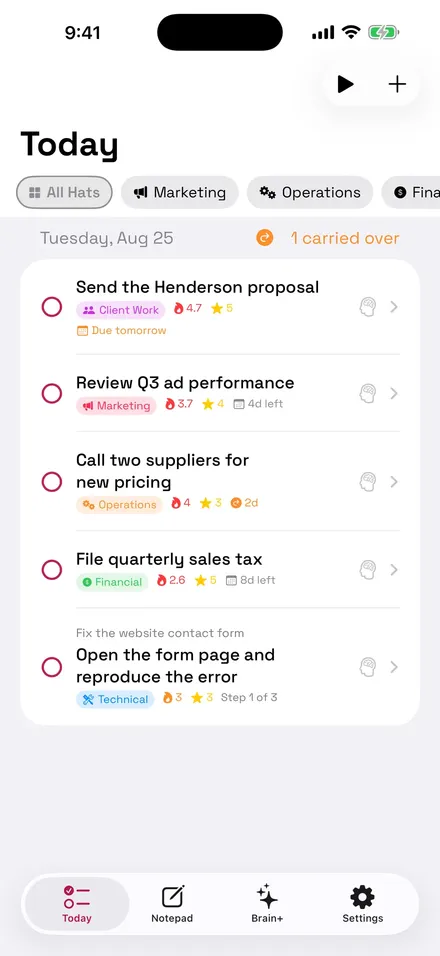
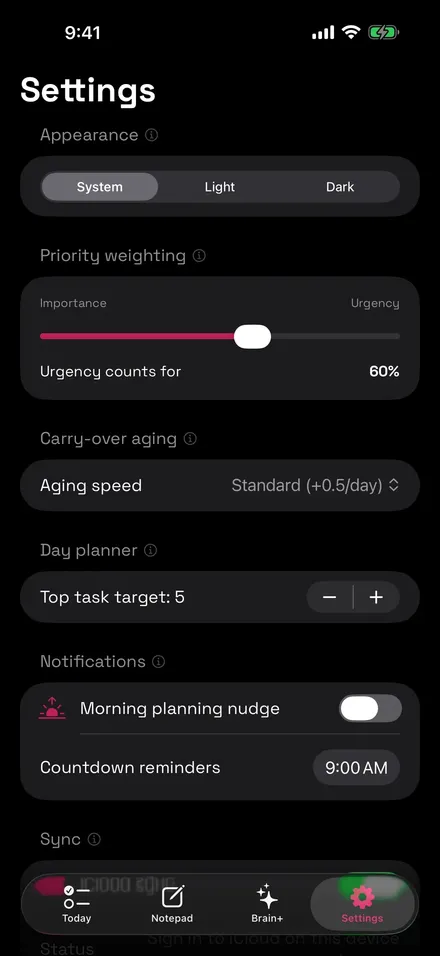
Today holds the tasks that matter most right now, ranked by a priority score that blends urgency and importance, with the weighting under your control. Whatever you don’t finish carries over on its own and climbs in urgency, so it comes back when it needs to and stays quiet until then. Give a task a due date and its urgency rises by itself, topping out at the deadline. Anything overdue pins to the top until you deal with it.

THE PART WE’RE PROUDEST OF

Stuck on something? Tap “Help me get started.”

Every owner has one task that has been sitting there for a week because it’s big, vague, or unpleasant. Business Brain shrinks it.

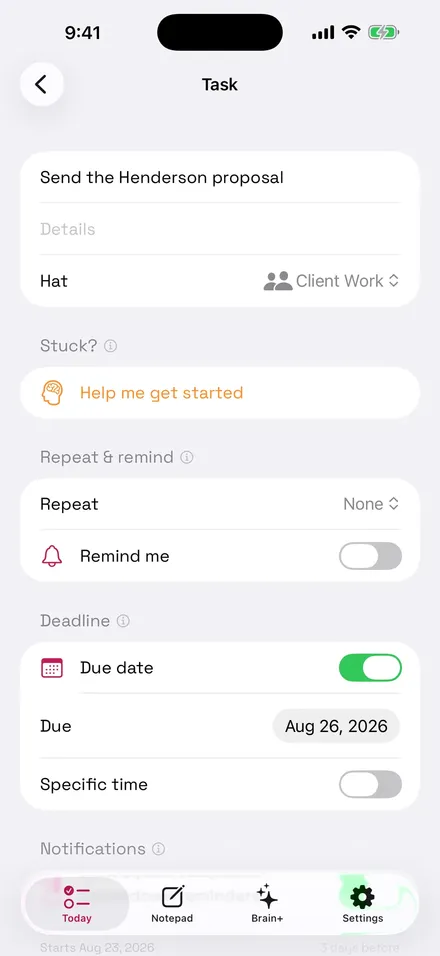
Tap Help me get started and the app breaks the task into smaller and smaller pieces until step one feels easy. Only the current piece shows up on Today, so you see one small thing to do at a time. If you want, AI drafts the breakdown for you and you edit it.

  • Sits right under the task title, so it’s the second thing you see when you open a task
  • Each piece is its own checkbox, and finishing one reveals the next
  • Works on tasks you type, tasks you dictate, and tasks converted from notes

WHAT’S INSIDE

Everything in the app

Today

A short daily list with automatic carryover. Unfinished tasks roll forward and gain urgency, so nothing gets lost.

Hats

Filter your tasks by the role you’re wearing: Marketing, Operations, Financial, Technical, Client Work, or any hat you create.

Notepad

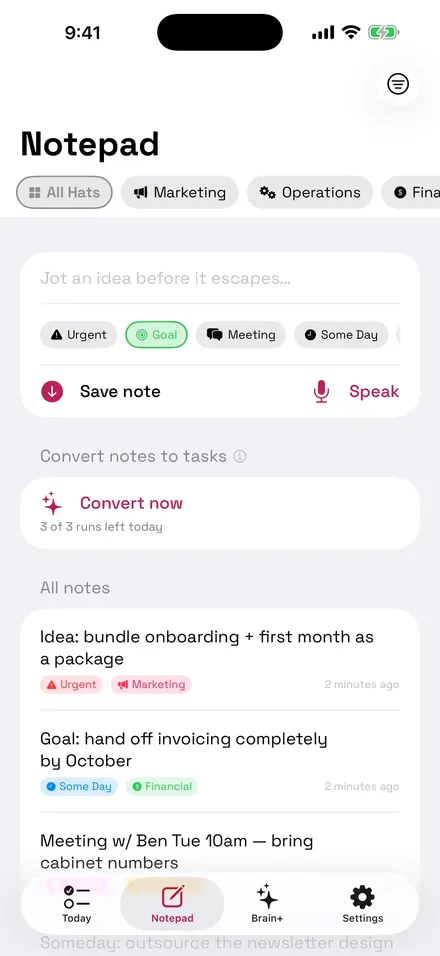
Everything else in your head goes here, tagged urgent, goal, meeting, someday, wish list, or general. AI can turn the actionable ones into ranked tasks, and you approve every single conversion.

Brain+ AI tools

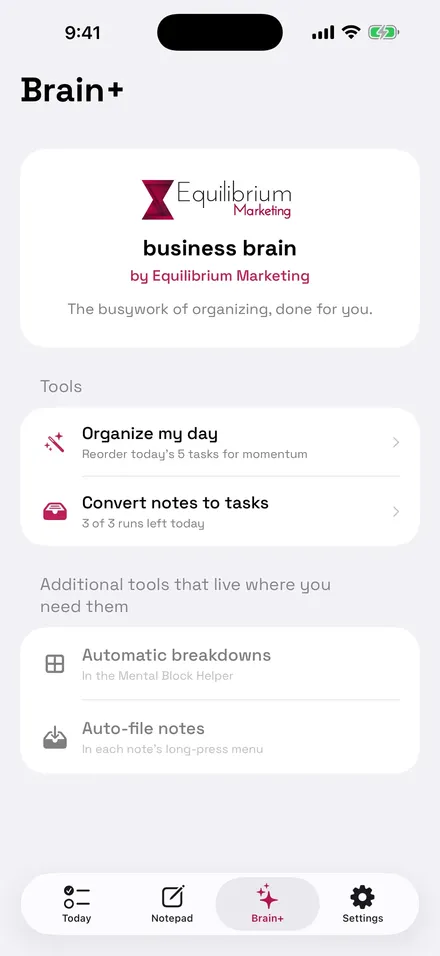
Organize my day, suggest a task breakdown, auto-file notes into categories, and convert notes to tasks. All optional, and all on your terms.

Due dates, reminders, calendar blocks

Urgency climbs toward the deadline on its own. Optional reminders include a morning planning nudge, per-task alerts, and countdowns at 3 hours, 1 hour, and 15 minutes on the day. Optional calendar blocks put a 30-minute event at the deadline plus lead-ups a day, three days, or a week before, and the app only ever touches events it created.

Focus Mode, widget, voice

A timeboxed full-screen mode for one task. A home-screen widget showing your Today list. Voice capture that uses on-device speech recognition where your phone supports it.

  • Recurring tasks that spawn the next copy when you finish one
  • Light, dark, and system themes
  • Optional iCloud sync across your own devices, stored in your private iCloud Drive
  • A short first-launch tour you can replay from Settings

A LOOK INSIDE

Four screens you’ll live in

Business Brain Today screen showing a short ranked task list
Task editor with the Help me get started breakdown section
Notepad with tagged notes ready to convert into tasks
Brain+ screen listing the AI tools

PRIVATE BY DESIGN

Where your tasks and notes actually live

On your phone. That’s it. We don’t run a server that stores your content, and there is no account to attach it to.

Turn on iCloud sync and your data goes to your own private iCloud Drive, which we cannot read. Use an AI feature and only the text of that one task or note is sent, over an encrypted connection, to generate the result; it is never tied to your identity and it is not retained. Skip the AI tools and nothing you type ever leaves your phone.

No ads. No analytics. No trackers. No selling data, because we don’t have any to sell. The full details are in the Business Brain privacy policy, written in plain English.

FAQ

Business Brain questions, answered straight

Is Business Brain free?

Yes. Free to download, free to use, with no ads, no accounts, no sign-in, and no subscriptions. Every feature is available the first time you open it.

What phone does it run on?

iPhone, running iOS 26.5 or later. Download it free from the App Store at https://apps.apple.com/us/app/business-brain/id6805551535. There is no Android or desktop version right now.

Do I need to create an account?

No. Open the app and start adding tasks. Your tasks and notes are stored on your phone, so there is nothing to sign up for and nothing tied to your name.

What happens to my notes when I use an AI feature?

Only when you tap an AI feature, the text of that task or note is sent over an encrypted connection to generate the result. It is never linked to your identity and it is not kept. If you never use the AI tools, nothing you type leaves your phone, apart from your own optional iCloud sync.

Does it sync between my devices?

If you turn on iCloud sync, your tasks and notes are stored in your own private iCloud Drive and follow you across your devices. That data lives in your Apple account. We cannot see it. Sync is off until you turn it on, and you can switch it off any time.

Who made Business Brain?

Equilibrium Marketing LLC in Loveland, Colorado, the same company behind this website. Questions go to phil@equilibriummarketing.com and a real person reads them.

Fewer tasks. Clearer days.

Free on the App Store. No account, no ads, no subscription. Put it on your phone and try it on tomorrow’s list.

Free audit. Real findings.

No obligation, and no follow-up sequence from hell. We look at your marketing and tell you the truth about it. Prefer talking? Call or text (970) 660-7253.